
Description
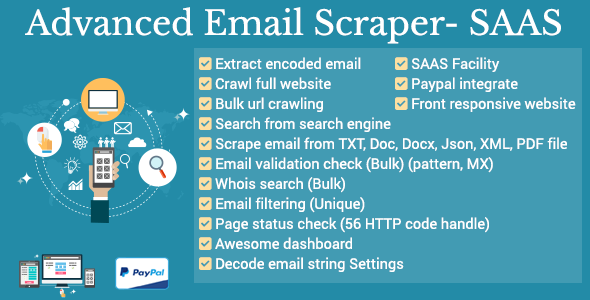
Advanced Email Scraper – SaaS is most powerful web based tool to extract emails by various techniques like website crawl, URL crawl, search in Google/Bing, search in txt/json/xml/doc/docx/pdf file. This script can also check email validation (pattern, MX record) , search for whois data, filter your email list by removing duplicate emails, decode modified email string, check web page status .
How email scraping works ?
Very simple. Just imagine you want to do your product marketing and need email address to let them know about your product.Think how much time consuming it is to collect email from google or Bing? We have made this work as easy like a click simple. Let say, you want people who are engaged in webdesign profession. So webdesign is your keyword. Put this keyword in the input field, then select Google or Bing for searching. Then try to more specific by selecting social network from where you want to collect. Then choose what email you want gmail, yahoo, hotmail, outlook etc. You are done! Start scraping. You don’t need to do anything more.Wait and see the magic of the tools.
It can also extract encrypted emails from sites, work both on http & https but can not extract emails generated by JavaScript.
It’s a multi-user SaaS application means you can resell the Software as a Service and can setup your own business. PayPal & Stripe are integrated so that you can receive payment from your end users.
Features
Web Crawling
Enter website address. The tool then start to find all url of the website and scrape email address from all urls. It can extract encoded email too.
Bulk URL Crawling
Upload your url from text or csv file. Start scraping all url. The tool then start to scrape email from all url you have uploaded.
Google Search
Search in Google with keyword, then select sites like facebook.com, linkedin.com, twitter.com or other sites to extract desired emails.
Bing Search
Search in Bing with keyword, then select sites like facebook.com, linkedin.com, twitter.com or other sites to extract desired emails.
Whois Search
Get the doamin’s whois information like admin email, technical email, name server, created date, expired date, last update date, sponsor. Have bulk search ability.
Email Validation
Check email is valid or invalid. Bulk checking facility is available. We check email pattern and MX record for validity checking.
Page status check
Check page status like , is it live or not found(404) and other 56 http responses. Bulk checking facility is available.
Email Filtering
Make your email list by removing duplicate email. Import txt or csv or put email in textarea, export list with unique email as txt / csv.
Search in DOC / DOCX File
Search email in doc /docx file. You can upload bulk doc /docx files and extract email from all doc /docx files.
Search in PDF File
Search email in pdf file. You can upload bulk PDF files and extract email from all pdf files.
Search in JSON / XML File
Search email in JSON / XML file. You can upload bulk JSON / XML files and extract email from all JSON / XML files.
Search in Text File
Search email in text file. You can upload bulk text files and extra







There are no reviews yet.